|
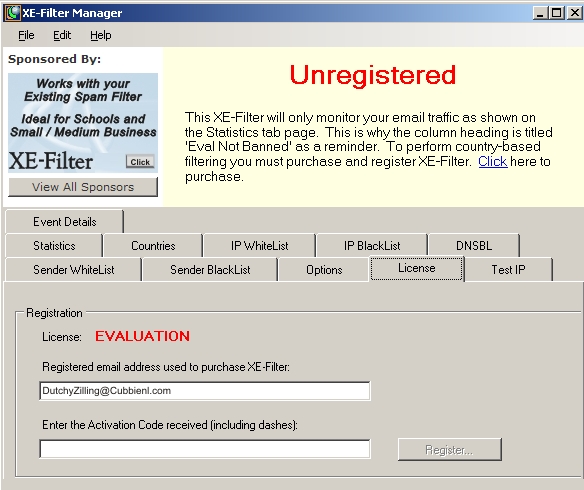
 REGISTERED EMAIL ADDRESS
|
|
This fields contains
the email address entered during the
installation of the XE-Filter software.
This email address is used as a serial number for product
authentication, as the point to receive periodic
XE-Filter news and as a unique log-in to the CMS website
for the software upgrade releases.
|
|
ACTIVATION CODE |
|
Upon purchase, an "Activation Code"
is sent to the registered email address.
Enter this code, exactly as it appears, in the
"Enter Activation Code" field. |
|
REGISTER BUTTON |
|
With both email address and exact activation code
entered press the "Register" button to unlock
the full capabilities of XE-Filter |
|
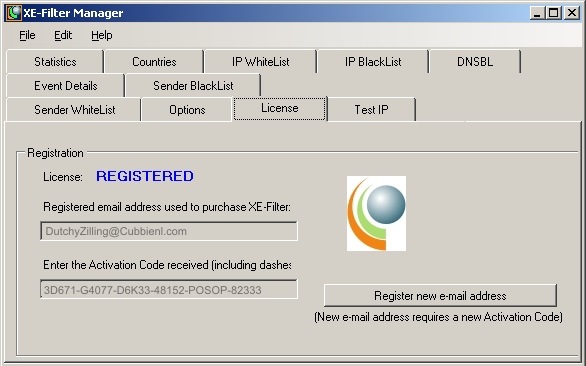
AFTER REGISTRATION |
|
Registered versions of XE-Filter display a "REGISTERED"
note next to the Registration License tag.
Also, the "Email Address" and "Activation Code" fields
are grayed out and inactive.
|
|
REGISTERING A NEW eMAIL ADDRESS |
|
Registering a new eMail address can be accomplished
by pressing the "Register new e-mail address" found
on the License tab of a registered XE-Filter
Manager.
This process also requires a new, unique XE-Filter authentication code.
To obtain this code complete this form:
|